Recording an AOT Deadlock Issue in .NET
1. Symptoms
The project is WinUI 3 + Native AOT. Everything runs fine during debugging, but after publishing and launching, it works normally for a few seconds, then the UI thread randomly becomes unresponsive, stuck in a "fuzzy state" — not a crash and exit, but a freeze with no response.

The strange part is:
- Runs fine in Debug mode
- Runs fine in non-AOT publish
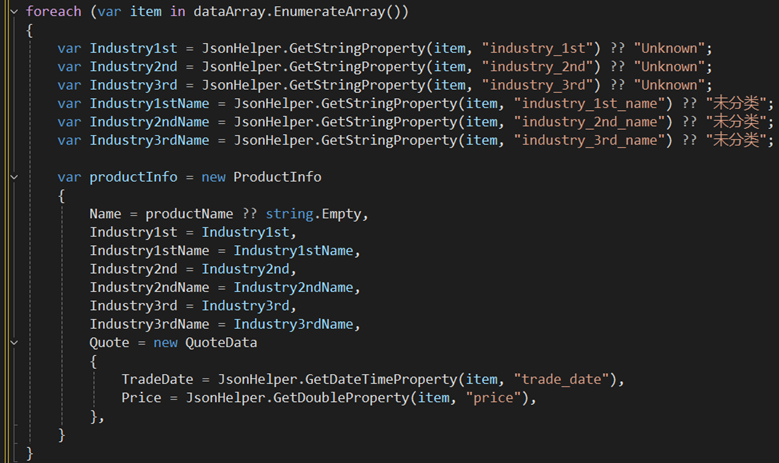
- Removing the JSON parsing calls inside makes it not hang
- Reducing the for loop count to only the first 100 records also makes it not hang
2. Hypotheses
Hypothesis 1: JsonElement metadata trimmed under AOT
Initially suspected that System.Text.Json's JsonElement dynamic access was missing metadata under Native AOT. But this was quickly disproven:
On the same item, GetStringProperty was called 8 times in a row, each involving TryGetProperty + GetString + string construction. If JsonElement had a metadata issue, the first GetStringProperty should have crashed.
Hypothesis 2: double value type returning a reference
TryGetDouble(out var value) — value is a double, a pure value type, copied directly, not referencing JsonDocument's internal buffer. Ruled out.
Hypothesis 3: Object initializer syntax
Splitting new QuoteData { ... } into new first and then assigning line by line still causes the hang, so assignment ordering is ruled out.
Hypothesis 4: ObservableObject's PropertyChanged
QuoteData inherits from ObservableObject, but changing it to plain auto-properties still reproduces the issue. Event mechanism ruled out.
3. Key Information
The observation that "it appears randomly after several seconds" is key. If the crash were data-level, it should trigger the moment that object is accessed. A delay of several seconds means:
- GC runs after a few seconds
- It reclaims some memory or traverses some list
- It hits an inconsistent state inside the runtime
Based on the stack structure of the frozen process, a similar issue record was found in the official dotnet/runtime Issues.
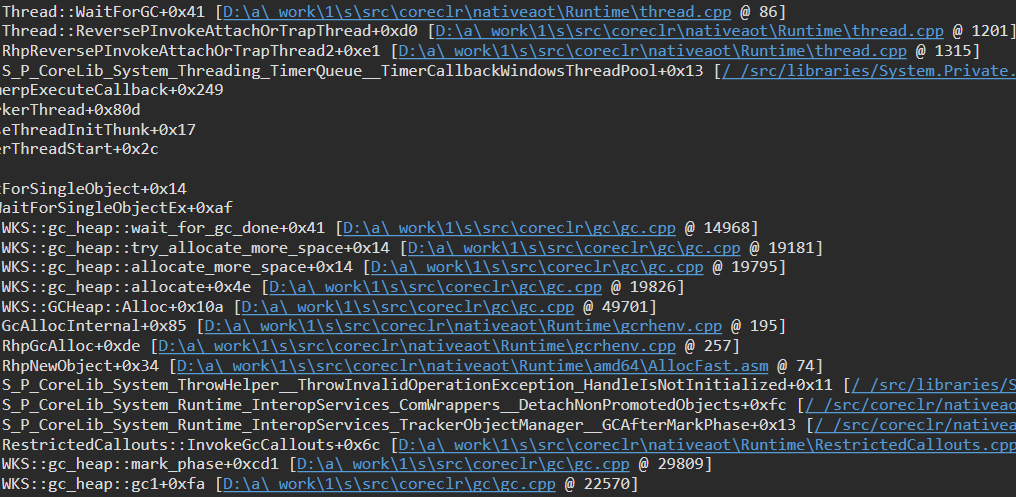
dotnet/runtime #104582:
"The collection being traversed entered a bad state — already-released entries remained in the list. This is the result of a missing lock on the removal operation, causing a race with the finalizer when it runs."
microsoft-ui-xaml #9928:
"The app starts, seems quite smooth, until the UI thread completely freezes. The deadlock happens very randomly, sometimes after a few minutes, sometimes after just a few seconds, but always when GC is waiting for collection to complete."
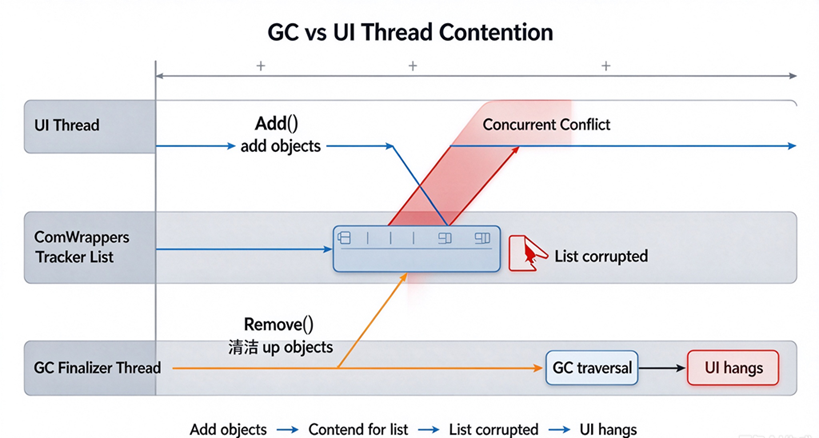
The complete chain of the problem:
-
Your code creates
ProductInfo/QuoteDataobjects -
Under the WinUI 3 environment, these objects are projected by CsWinRT into native object wrappers
-
The wrappers are registered into the runtime's global tracker list
-
The UI thread adds entries to the list, while the GC finalizer thread removes entries from the list
-
The removal operation lacks lock protection; both threads operating simultaneously corrupts the list's internal pointers
-
A few seconds later, GC traverses the list again, reads the bad pointer → hang or access violation
Why "removing a certain call" "fixes" it
In reality, this is not a fix — it lowers the trigger probability. Removing the GetDoubleProperty or GetDateTimeProperty call reduces the number of wrappers created during a single traversal. The frequency of add operations decreases, shrinking the probability window of colliding with the finalizer's "removal operation."
Likewise, taking only the first 100 records or batching are all the same logic: reducing the wrapper creation density during a single traversal, avoiding the lock contention window.
4. Solution
If you encounter a similar issue, while waiting for a runtime update, you can adopt batching to lower the trigger probability: split the large array into small batches, and after each batch, let the UI thread yield once, giving GC a chance to complete its traversal.
Of course, this only lowers the contention probability. A single yield takes milliseconds, depending on how busy the message queue is. The best approach, of course, is still to upgrade the .NET version.
This issue has been fixed and merged into the latest .NET. Friends encountering similar issues can simply upgrade their project's .NET version:
- Fix commit:
dotnet/runtime@d7948dc— "Fixes hang in WinUI apps published to AOT (#104583)" - Currently merged into the .NET 9 branch; .NET 8 users should see the issue disappear after upgrading to the latest patch version
5. Summary
- In conclusion, this problem is not in your code — it's a ComWrappers lock contention under the .NET runtime AOT path
- It's also unrelated to JSON parsing; it's related to the behavior of "creating a large number of objects"
- If batching can work around it, it only lowers the probability
- The root fix requires upgrading to a .NET runtime version that contains the fix
Reference Links